 SIFCEXPORT - IfcExportAs
SIFCEXPORT - IfcExportAs
SIFCEXPORT - IfcExportAsBefore using the SIFCEXPORT command, ensure that you have configured the IfcExportAs property for all devices used in the networks within the modeler:
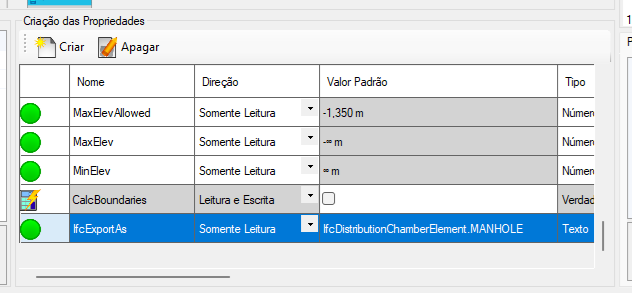
If you are using the devices provided with the plugin, this property is already defined. However, if you wish to change it, open the modeler properties, locate where this property is edited, and change the value:
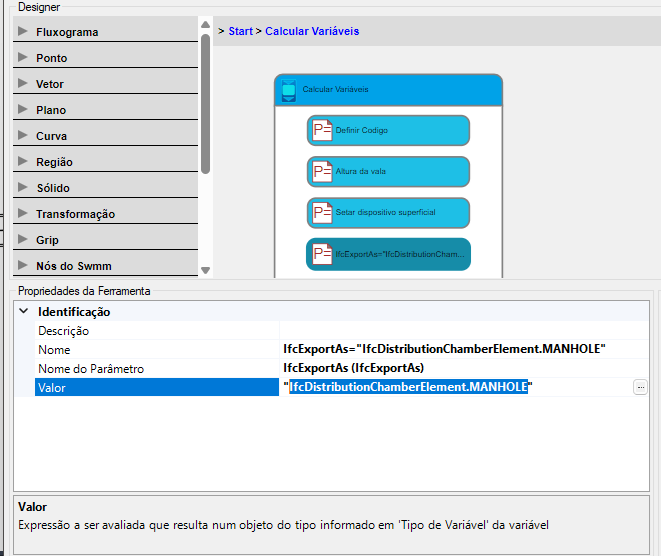
In the example, the value used is "IfcDistributionChamberElement.MANHOLE", which means the manhole will be an IfcDistributionChamberElement with the subtype MANHOLE.
IfcDistributionChamberElement -
A distribution chamber element defines a location where distribution systems and their constituent elements can be inspected or pass through.
An IfcDistributionChamberElement is a formed volume used in a distribution system, such as a reservoir, trench, or culvert.
Instances of IfcDistributionSystem or IfcDistributionFlowElement can be related to IfcDistributionChamberElement, allowing their location within or at the chamber to be determined.
It is associated with IfcDistributionChamberElementType.
The IfcDistributionChamberElement class has the property IfcDistributionChamberElementType, which can take one of the following values:
It is important to note how to write the class name in SOLIDOS:
See Also:
 SBUILDER
SIFCEXPORT
SBUILDER
SIFCEXPORT SPSETS