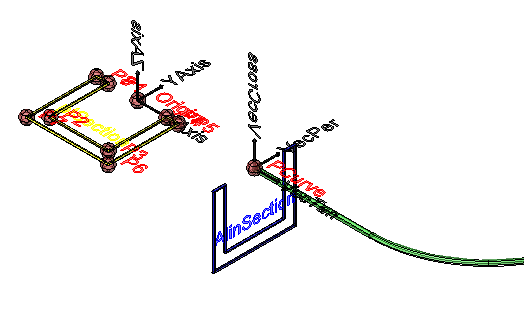
 Ucs - creates a clone of anything drawable and aligns it in another coordinate system (not deformed):
 Ucs - creates a clone of anything drawable and aligns it in another coordinate system (not deformed):
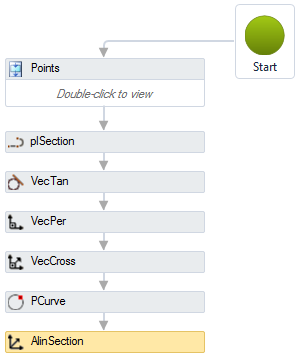
Note, the source item will not be modified. The geometry will be cloned and then aligned with the parameters entered.
The Ucs activity has the following properties:
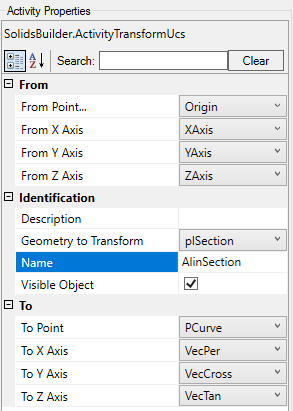
 Point that serves as the origin of the object's current coordinate system
 vector that indicates the X axis of the object's current coordinate system vector that indicates the Y axis of the object's current coordinate system vector that indicates the Y axis of the object's current coordinate system Point that serves as the origin of the object's destination coordinate system vector that indicates the X axis of the object's destination coordinate system vector that indicates the Y axis of the object's destination coordinate system vector that indicates the Y axis of the object's destination coordinate system
 Note:
Note:
 Displacement and
  3D Rotate.
 Perpendicular and
  Cross product to obtain orthogonal vectors
If the text is too big/small, or the sphere representing the point is too big or small, use the buttons ( A, a,  ,
,  ) at the top of the screen to change the preview