Solids Builder - Displacement
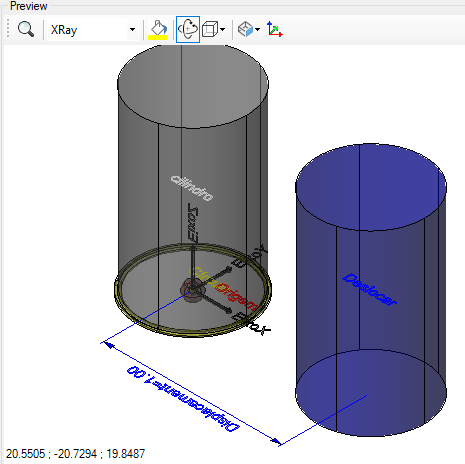
 Displacement - creates a clone of anything drawable in another position:
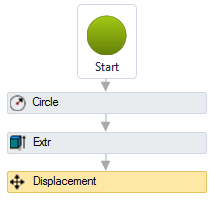
Note, the source item will not be modified.
The geometry will be cloned and then moved to another position.
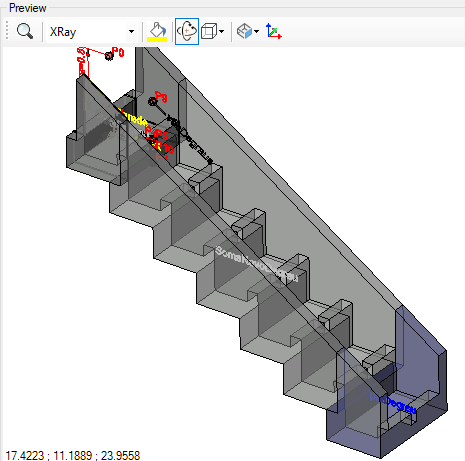
This activity is used, for example, to duplicate a model step on a ladder:
The Move activity has the following properties:
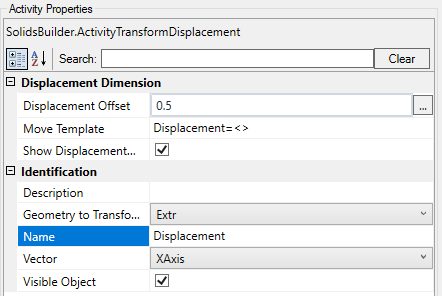
- Identification
- Name - extrude name
The activity name must follow the naming rules
- Geometry to Transform - name of the geometry to be transformed
- Vector - displacement
 vector name
In AutoCAD, the MOVE command creates a vector from Base point (source) to Destination Point (destination).
Use the activity  Point to Point Vector if necessary
- Visible Object - indicates whether or not the point should be drawn in the preview
- Displacement Dimension
- Displacement Offset - VB expression that distances the dimension line
- Show Displacement Dimension - indicates whether to draw a dimension in the displacement vector
- Displacement Template - a text template that provides the dimension
Use <> for the dimension(Example: Displacement = <>)
If the text is too big/small, or the sphere representing the point is too big or small, use the buttons ( A, a,  ,
,  ) at the top of the screen to change the preview