Solids Builder - Vectors
Vectors are auxiliary geometries for drawing more complex geometries.
There are the following activities that create vectors:
 Vector (XYZ) - creates a vector for its properties: X, Y, Z
 Tangent - calculates the vector tangent to a curve at a point (first derivative)
 Vetor Point to Point - creates a vector between two known points
 Perpendicular - calculates the normal vector to another vector
 Cross Product - calculates the cross product of two vectors (axisZ = axisX * axisY)
Properties (to use in VB expressions):
- X - X component
- Y - Y component
- Z - Z component
- Length - vector length
Methods (to use in VB expressions):
- New - creates a new instance of a vector
pt = New GeometryVector(x, y, z)
Where: x, y, z are real numbers
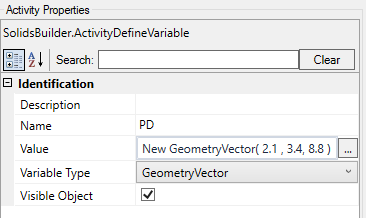
- * (multiply) - multiply a vector by a Scale (real number)
vet = vector * value
here:
vet and vector are vectors
value is a real number
- / (divide) - divide a vector by a Scale (real number)
vet = vector / value
Where:
vet and vector are vectors
value is a real number
- AngleOnPlane - calculates the angle of the projected vector on the plane
angle = vector.AngleOnPlane (plane)
Where:
angle will be a real number that represents the angle in radians
plan is a plan
vector is a vector
- GetAngleTo - calculates the angle between two vectors, in the plane that contains them
angle = vectorA.GetAngleTo (vectorB)
Where:
angle will be a real number that represents the angle in radians
vectorA and vectorB are vectors