Solids Builder - Swept
 Swept - creates a solid by scanning a flat figure (
 circleou
  polyline) into a one curve:

Swept activity is typically used to create longitudinal, or linear devices, Where: the section is constant:
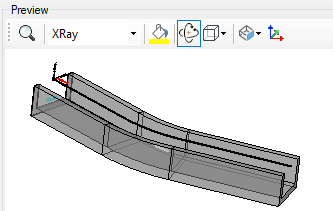
The Scan activity has the following properties:
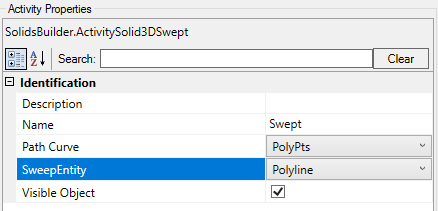
- Identification
- Name - extrude name
The name of the extrude must follow the naming rules
- Figure to Extrude - name of the flat curve to be extruded ( circleou polyline)
Note, ideally, the section should be aligned with the path cure.
To do this, you can use the example scheme, using the  Ucs activity:
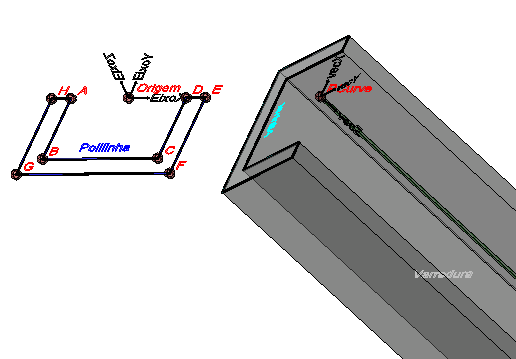
also note that Civil 3D deforms the pipe section, doing something like this:
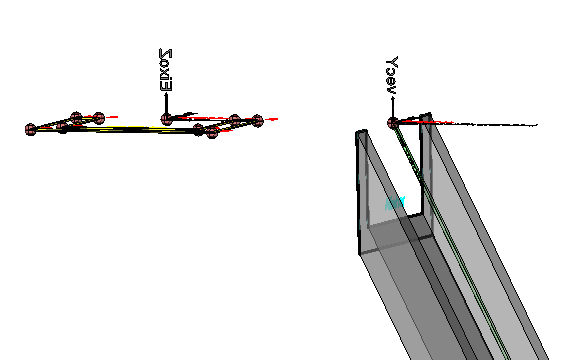
For small declivities this does not matter, but in water descents, it makes a lot of difference.
In these cases, you can calculate a height deformed that takes into account the slope of the slope, or align the section with the slope
- Path Entity - name of the curve Where: the section will be slid
- Visible Object - indicates whether or not the point should be drawn in the preview
If the text is too big/small, or the sphere representing the point is too big or small, use the buttons ( A, a,  ,
,  ) at the top of the screen to change the preview