Solids Builder - Curve Intersection
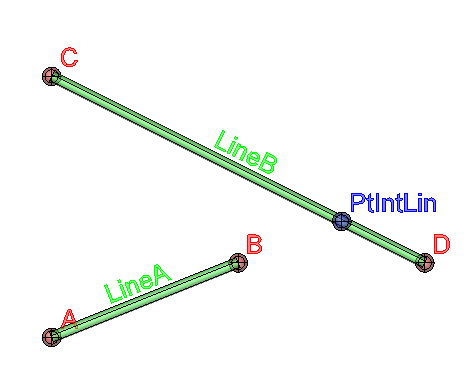
 Curve Intersection - creates a point at the intersection of two curves:
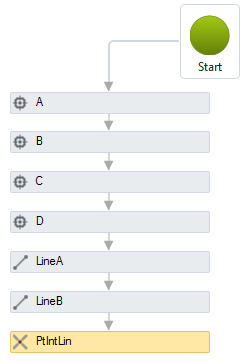
The Curve Intersection activity has the following properties:

- Identification
- Name - point name
The point name must follow the naming rules
- Visible Object - indicates whether or not the point should be drawn in the preview
- Main Curve - name of the main curve
- Other Curve - name of the other curve
- Intersect - indicates how the intersection points will be calculated:
- Extend Both - calculates an intersection point even if the lines do not cross effectively, in this case, the lines will be stretched if necessary.
It would be like making the intersection of XLINEs
- Extend This - calculates intersection points by stretching the main curve if necessary
- Extend Other - calculates intersection points by stretching the secondary curve if necessary
- On Both Operands - calculates intersection points only if curves intersect effectively
- XY Plane - a VB expression that evaluates to True or False, saying that the curves must be projected on the XY plane before calculate the intersection points.
When true, the Z value can be interpolated between the Z of each curve.
If false, the curves must intersect three - dimensionally
- Index - index of the point you want in the calculated list
Note, the crossing of lines can occur in more than one position.
It is advisable to analyze which point is desired, as this activity only returns one point.
The position of the points in the list of calculated points is not random, because of the algorithm used, they are always calculated in the same order.
Try to vary the index to check the index that best fits your model
If the text is too big/small, or the sphere representing the point is too big or small, use the buttons ( A, a,  ,
,  ) at the top of the screen to change the preview