Solids Builder - Offset
 Offset - creates an offset curve from another curve, given a distance:
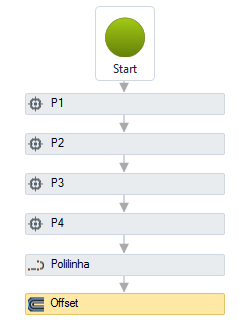
Note, polyline offset can generate more than one polyline. In case this occurs, only the first line will be considered. This activity can be used to facilitate the creation of device walls:

The Offset activity has the following properties:
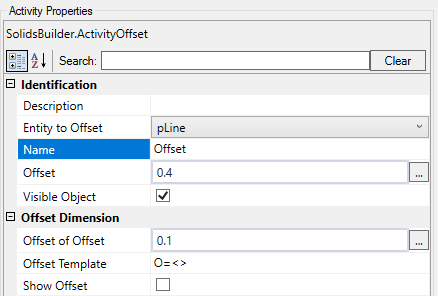
- Identification
- Name - name of the activity
The name of the activity must follow the naming rules
-
Offset line - name of the geometry to be processed
-
Distance - distance from the offset line. Note, positive or negative values ??can be entered. User should check which situation produces the expected curve
-
Visible Object - indicates whether or not the geometry should be drawn in the preview
-
Offset Dimension
-
Removal from Offset - VB expression that distances the dimension line
-
Quote Offset - indicates whether to draw a dimension on the offset vector
-
Dimension Template - a text template that provides the dimension
Use <> for the dimension
(Example: Offset = <> )
If the text is too big/small, or the sphere representing the point is too big or small, use the buttons ( A , a , ,
, ) at the top of the screen to change the preview