"Could not load file or assembly"
En algunos casos, el comando NETLOAD no carga la DLL y muestra este error en la línea de comando:
Cannot load assembly.
Error details: System.
IO.
FileLoadException:
Could not load file or assembly
'file:///C:\TBN2CAD\TBN2CAD.dll'
or one of its dependencies.
Operation is not supported.
(Exception from HRESULT: 0x80131515)
File name: 'file:///C:\TBN2CAD\TBN2CAD.dll ' --->
System.
NotSupportedException: An attempt was made to load an assembly
from a network location which would have caused the assembly
to be sandboxed in previous versions of the.
NET Framework.
This release of the.
NET Framework does not enable CAS policy by default,
so this load may be dangerous.
If this load is not intended to
sandbox the assembly, please enable the loadFromRemoteSources switch.
See http://go.microsoft.com/fwlink/?LinkId=155569 for more information.
Para corregir este error, primero intente este procedimiento..
Si esto no funciona, cierre AutoCAD y busque el archivo: C:\Program Files\Autodesk\AutoCAD\Acad.exe.config
Cambiar sus propiedades a lectura y escritura:
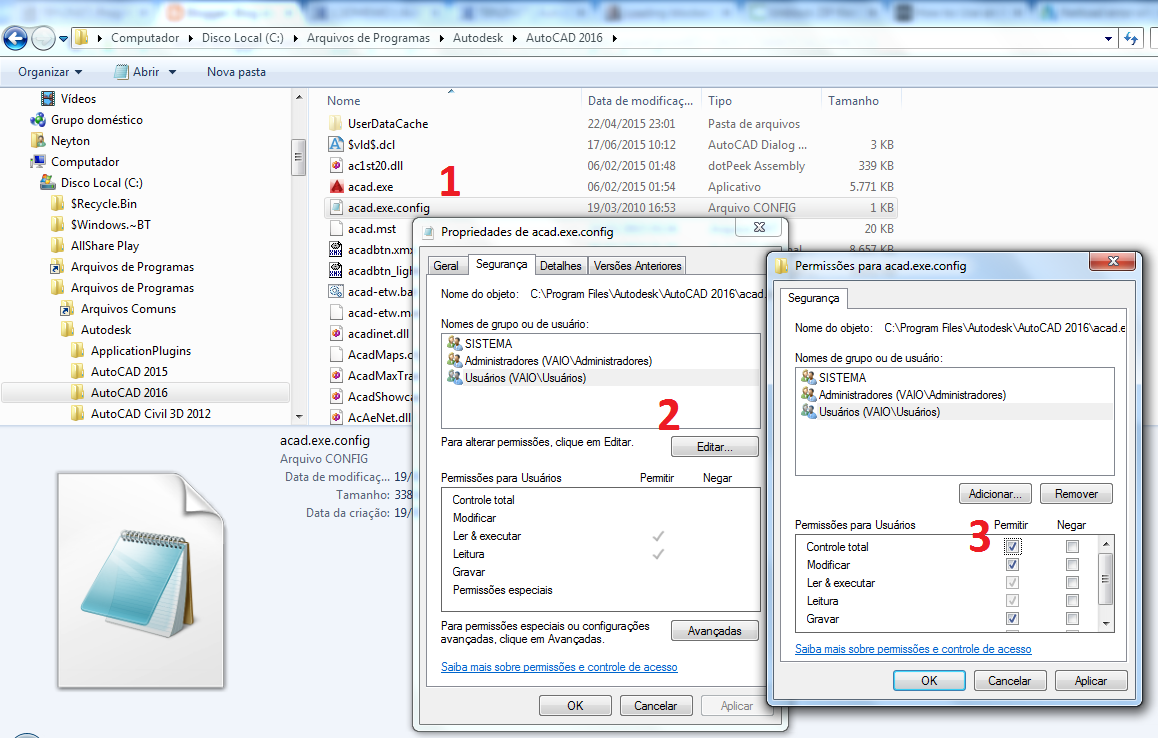
Abre con el bloc de notas e incluye esto:
<runtime>
<loadFromRemoteSources
enabled="true"/>
</runtime>
Debe tener un aspecto como este:
<configuration>
<startup
useLegacyV2RuntimeActivationPolicy="true">
<supportedRuntime
version="v4.0"/>
</startup>
<runtime>
<loadFromRemoteSources
enabled="true"/>
</runtime>
<system.
Diagnostics>
<sources>
<source
name="System.
Windows.
Data"
switchName="SourceSwitch">
<listeners>
<remove
name="Default" />
</listeners>
</source>
</sources>
</system.
Diagnostics>
</configuration>
Guarde, abra AutoCAD e intente NETLOAD nuevamente.